
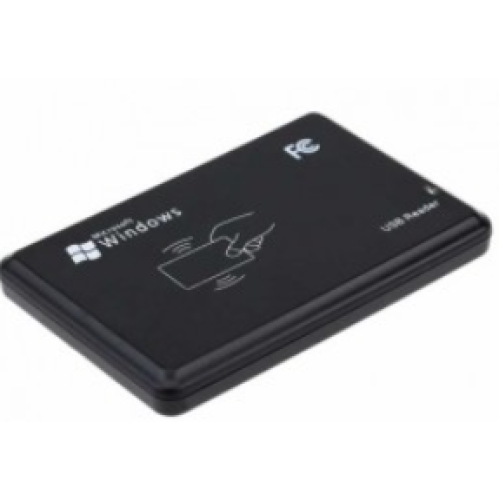
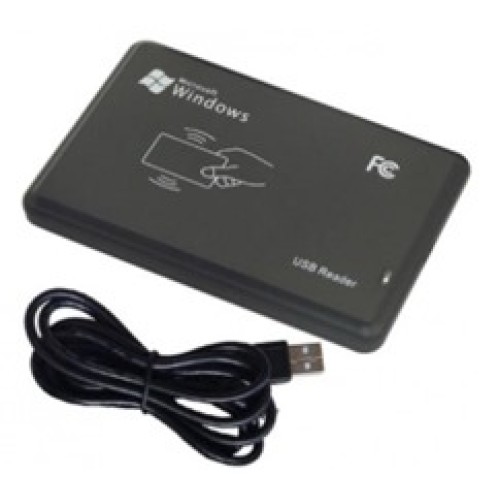
R20C USB HF MIFARE Kart Okuyucu – 13.56 MHz
- Ürün Kodu: R20C-USB
R20C USB HF MIFARE Kart Okuyucu – 13.56 MHz
R20C USB HF MIFARE Kart Okuyucu, 13.56 MHz frekansında çalışan temassız RFID kartların seri numarasını hızlı ve kolay şekilde bilgisayara aktarmak için tasarlanmış kompakt bir masaüstü okuyucudur. USB bağlantısı sayesinde bilgisayara kolayca bağlanır ve uyumlu kart okutulduğunda kart kimlik bilgisini aktif yazılım alanına aktarır.
Personel devam kontrol sistemleri, ziyaretçi kayıt uygulamaları, üyelik sistemleri, geçiş kontrol yazılımları, otopark yönetimi ve kullanıcı tanımlama projelerinde kullanılabilir. Klavye benzetimi mantığıyla çalışan konfigürasyonlarda kart numarası Not Defteri, Excel, web uygulaması veya kurumsal yazılım üzerindeki aktif alana otomatik olarak yazdırılabilir.
Öne Çıkan Özellikler
ISO 14443A protokolüyle uyumlu temassız kartların okunmasını destekler.
MIFARE S50, S70, NTAG203 ve uyumlu ISO 14443A kartlarla kullanılabilir.
Bilgisayarın USB portuna bağlanarak hızlı şekilde kullanıma alınabilir.
Kart numarasını aktif metin alanına otomatik olarak aktarabilir.
Uyumlu kartların kimlik bilgisini kısa sürede okuyarak iş akışını hızlandırır.
Danışma, ofis, güvenlik noktası ve kayıt masalarında az yer kaplar.
Nasıl Çalışır?
- R20C okuyucunun USB kablosunu bilgisayara bağlayın.
- Kart numarasının aktarılacağı yazılımı, web formunu, Excel dosyasını veya metin alanını açın.
- İmleci kart numarasının yazılmasını istediğiniz alana getirin.
- Uyumlu 13.56 MHz MIFARE kartı okuyucunun üzerine yaklaştırın.
- Kart kimlik numarası seçili alana otomatik olarak aktarılır.
Kullanım Alanları
Teknik Özellikler
| Model | R20C |
| Ürün Tipi | USB masaüstü HF RFID kart okuyucu |
| Çalışma Frekansı | 13.56 MHz |
| Desteklenen Protokol | ISO 14443A |
| Desteklenen Kartlar | MIFARE S50, S70, NTAG203 ve uyumlu ISO 14443A kartlar |
| Bağlantı Arayüzü | Kablolu USB |
| Güç Beslemesi | USB üzerinden DC 5 V |
| Varsayılan Çıkış Formatı | 10 haneli ondalık kart numarası |
| Okuma Mesafesi | Kart ve ortam koşullarına bağlı olarak yaklaşık 0–100 mm |
| Okuma Süresi | 200 ms'den kısa |
| Boyutlar | Yaklaşık 104 × 68 × 10 mm |
| Çalışma Sıcaklığı | -10°C ile +70°C |
| Çalışma Nemi | %90'dan düşük |
Teknik değerler ürün konfigürasyonuna, kullanılan kart tipine, kartın anten yapısına, çıktı formatına ve çalışma ortamına göre değişebilir. Satın alma öncesinde kart uyumluluğu ve gerekli veri çıkış formatı doğrulanmalıdır.
R20C USB HF MIFARE Kart Okuyucunun Avantajları
- USB bağlantısı sayesinde kolay ve hızlı kurulum sunar.
- Uyumlu sistemlerde ek bir seri port ayarı gerektirmeden kullanılabilir.
- Kart numarasını yazılım üzerindeki aktif alana otomatik aktarabilir.
- Mevcut web, masaüstü ve kayıt uygulamalarına kolayca uyarlanabilir.
- Kompakt yapısı sayesinde çalışma masasında az yer kaplar.
- Personel, ziyaretçi, üye ve kullanıcı kartlarının hızlı tanımlanmasına yardımcı olur.
Kart Uyumluluğu Hakkında Önemli Bilgilendirme
R20C, her 13.56 MHz kartı otomatik olarak desteklemez. Kullanılacak kartın ISO 14443A protokolü, çip modeli, UID yapısı ve yazılımın beklediği veri formatı ürün seçimi öncesinde kontrol edilmelidir. Kart hafızasına veri yazma, şifreli sektörleri okuma veya güvenli kimlik doğrulama gerektiren projelerde standart UID okuyucu yerine farklı bir okuyucu modeli gerekebilir.
Neden Atlas HCS?
Sık Sorulan Sorular
R20C hangi kartları okuyabilir?
R20C; MIFARE S50, S70, NTAG203 ve ISO 14443A protokolüyle uyumlu belirli 13.56 MHz kartların kimlik numarasını okuyabilir. Projede kullanılacak kartın çip modeli önceden doğrulanmalıdır.
R20C için sürücü veya özel yazılım gerekir mi?
Standart USB klavye benzetimiyle çalışan konfigürasyonlarda genellikle ek sürücü gerektirmez. Ancak özel çıktı formatı veya uygulama entegrasyonu için ek yazılım ya da yapılandırma gerekebilir.
Kart numarası hangi programa aktarılır?
Kart numarası, imlecin aktif olduğu Not Defteri, Excel, web formu, PDKS uygulaması, üyelik yazılımı veya benzeri metin giriş alanına aktarılabilir.
R20C kart üzerine veri yazabilir mi?
Bu ürün temel olarak kart kimlik numarası okuma uygulamaları için kullanılır. Kart hafızasına veri yazılması veya şifreli sektörlerin yönetilmesi gerekiyorsa okuyucu konfigürasyonu ve farklı okuyucu seçenekleri değerlendirilmelidir.
R20C PDKS ve geçiş kontrol yazılımlarıyla kullanılabilir mi?
Yazılım klavye üzerinden girilen kart numarasını kabul ediyorsa R20C birçok PDKS, üyelik ve kayıt uygulamasında kullanılabilir. Kart numarası uzunluğu ve veri formatı yazılımla karşılaştırılmalıdır.
Kartınızla Uyumluluğu Kontrol Edin ve Teklif Alın
Kullanacağınız kartın çip modelini, beklenen kart numarası formatını ve uygulama bilgilerini Atlas HCS ekibiyle paylaşarak R20C okuyucunun projenize uygunluğunu değerlendirebilir ve kurumsal teklif alabilirsiniz.